Setting table height with UCC Server I++
CMM-Manager reads all setup information for machine volume and table position from UCC Server using Full Sync.

Note: Full Sync ability is not available until UCC Suite 5.0. Please contact QxSoft support if you are running a version of UCC Suite earlier than 5.0.
CMM-Manager machine volume display
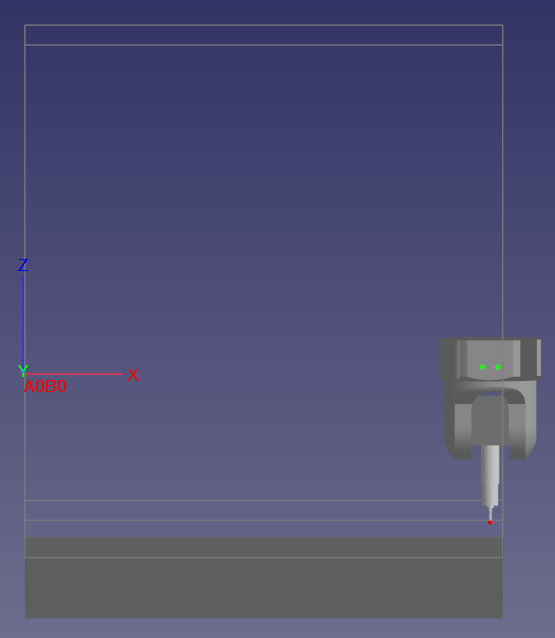
CMM-Manager table and volume
In this picture of CMM-Manager (tilted slightly toward the viewer), the machine volume is represented by the white outline. This machine volume, as well as the top of the table comes from UCC Server. In CMM-Manager, the size of the table is fixed and cannot be modified. Only the position of the table top can be modified from UCC Server. The "Update Table Position" function will be grayed out in CMM-Manager.
UCC Server configuration
The actual machine volume is configured by service during machine commissioning. There are no user editable values. The table position should be set by service during this process. If not, it can be changed in the advanced tab of UCC Server.
Locating the CMM Bed
Directly editing the CMMBed values affects the display of the CMM Bed in UCC Server only (View tab). Other than the Maximum Z, these values have nothing to do with the machine volume. The machine volume is not displayed in UCC Server. The Maximum Z is the only value here that affects CMM-Manager.
Oversized table in UCC Server
Here, we have created an oversized bed in UCC Server. This is what is displayed in UCC Server. The machine volume is not affected, and since the Maximum Z has not been changed, this configuration will work exactly the same with CMM-Manager.
Final Result
After a Sync request from CMM-Manager, i f UCC Server is configured properly, the position of the probe tip in relation to the table should be the same in both CMM-Manager and UCC Server as well as the physical position of the probe.
CMM-Manager with proper UCC Server configuration