Define Gear
Any gear that CMM-Manager will inspect must first be defined. Various parameters about the gear's size, number of teeth, and tooth profile are required; these parameters are stored in a gear parameter file. You can also define DCC motion parameters specific to measuring the gear.
Part Information
Part Name - Enter the name associated with the gear to be inspected.
Gear Parameters - External (OD) Gear
Gear Type - Select External for an OD gear.
Number of Teeth - Enter the number of gear teeth.
Nominal Pressure Angle - The angle at a point on the pitch cylinder between the tooth surface normal and the tangent to the pitch cylinder. This will be obtained from Spline Data block on the manufacturer print or supplied by the customer. Accurate and correct information is critical.
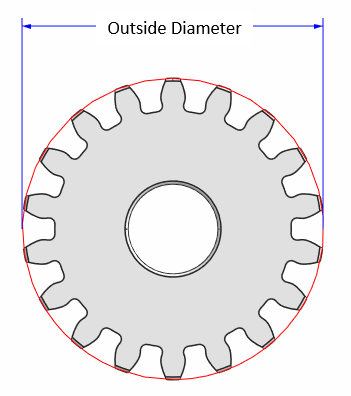
Outside Diameter - The diameter of the addendum circle.
Start Diameter - The diameter at the starting point of the checked profile. The profile variation is evaluated between this point and outside circle.
Normal Tooth Thickness - The circular tooth thickness in the normal plane along the pitch circle. Mathematically, it is the circumference of the Pitch Circle divided by 2x Number of Teeth. However, it is often slightly smaller to prevent the potential interference fit. Please use the appropriate value noted on your spline data sheet and contact the author of the drawing if unclear.
Normal Module (Metric only) - The value of the module (Pitch Diameter / No. of teeth) in the gears normal plane.
Diametral Pitch (Inch only) - The value of Diametral Pitch (No. of teeth / Pitch Diameter) in the gears normal plane.
Face Width - The length of the teeth in an axial plane.
Helix Angle - The angle that the tooth direction makes with the gear axis at the pitch circle. For a spur gear, this is 0.
Root Diameter - The diameter of the root circle.
Boss Depth - The distance from the top surface to the nearest gear face. The value depends on how the gear is placed.
In the below example, the Boss Depth will be 0 if there is no boss or the gear is placed such that the gear face forms the top surface.
For the example below, the Boss Depth is -20 since the gear is placed such that the boss face forms the top surface.
Clear Height - Approximate clearance height from the top gear face to the tip such that the probe can change its angles without collision. Be sure to allow for the boss if the gear is positioned with the boss "up".
Also, please ensure to set the sufficient height in case if A90 tips are used as the probe head will be closer to the gear compared to A0.
Back Out Dist - When changing tip, the distance that tip moves out from the Outside Diameter.
Gear Parameters - Internal (ID) Gear
Gear Type - Select Internal for an ID gear.
Number of Teeth - Enter the number of gear teeth.
Nominal Pressure Angle - The angle at a point on the pitch cylinder between the tooth surface normal and the tangent to the pitch cylinder. This will be obtained from Spline Data block on the manufacturer print or supplied by the customer. Accurate and correct information is critical.
Inside Diameter - The diameter of the addendum circle.
Normal Tooth Thickness - The circular tooth thickness in the normal plane along the pitch circle. Mathematically, it is the circumference of the Pitch Circle divided by 2x Number of Teeth. However, it is often slightly smaller to prevent the potential interference fit. Please use the appropriate value noted on your spline data sheet and contact the author of the drawing if unclear.
Normal Module (Metric only) - The value of the module (Pitch Diameter / No. of teeth) in the gears normal plane.
Diametral Pitch (Inch only) - The value of Diametral Pitch (No. of teeth / Pitch Diameter) in the gears normal plane.
Face Width - The length of the teeth in an axial plane.
Helix Angle - The angle that the tooth direction makes with the gear axis at the pitch circle. For a spur gear, this is 0.
Root Diameter - The diameter of the root circle.
Boss Depth - The distance from the top surface to the nearest gear face. The value depends on how the gear is placed.
It will be zero for the gear shown below due to the absence of a boss.
However, the depth will be -20 for below.
Boss Diameter - The diameter of the internal ring of the boss.
Clear Height - Approximate clearance height from the top gear face to the tip such that the probe can change its angles without collision. Be sure to allow for the boss if the gear is positioned with the boss "up".
Back Out Dist - When changing tip, the distance that tip moves out from the Inside Diameter.
Probe A Angle - A-axis tip angles to be used for the gear measurement. The proper angle should be specified here to avoid a collision with gear, fixture, or any other obstacles.
Gear Parameters - Straight Bevel
Gear Type - Select Straight Bevel gear.
Number of Teeth - Enter the number of gear teeth.
Pressure Angle - The angle on the pitch cone between the tooth surface normal and the tangent to the pitch cone. This will be obtained from Spline Data block on the manufacturer print or supplied by the customer. Accurate and correct information is critical.
Outside Diameter - The outer diameter of the gear teeth. This is important for path planning and helps locate the bevel.
Circular Tooth Thickness - The circular tooth thickness in the normal plane along the pitch cone at the heel of the gear. Mathematically, it is the circumference of the Pitch Circle at the heel divided by 2x Number of Teeth. However, it is often slightly smaller to prevent the potential interference fit. Please use the appropriate value noted on your spline data sheet and contact the author of the drawing if unclear.
Normal Module (Metric only) - The value of the module (Pitch Diameter / No. of teeth) in the gears normal plane.
Diametral Pitch (Inch only) - The value of Diametral Pitch (No. of teeth / Pitch Diameter) in the gears normal plane.
Pitch Angle - The cone angle that acts as the reference surface for tooth meshing, representing the equivalent of two friction cones rolling together without slipping.
Face Angle- The angle between the gear axis and the top edge of the teeth, generally calculated as the sum of the pitch angle and the dedendum angle.
Root Angle- The angle between the gear axis and the root cone, determined by subtracting the dedendum angle from the pitch cone angle.
Face Width- The face width is the width of the bevel gear’s teeth along the addendum circle direction. It works by affecting the bevel gear’s load-bearing capacity, meshing smoothness, and efficiency.
Boss Depth - The full height of the gear including any mounting shafts.
Clear Height - The clearance distance above full boss depth.
Back Out Dist.- The radial clearance distance away from gear teeth before performing a tip change.
Mounting Dist.- The distance from boss base/mounting surface to apex of bevel pitch cone. Note: Gear reference origin needs to be at this mounting cone apex for correct location of gear definition.
Whole Depth- The total radial height from the outer diameter to the root diameter, calculated as the sum of the addendum and dedendum.
Addendum- The radial distance between the pitch cone and the face cone at the heel (large end) of the tooth. It is often equal to the gear module and determines the tooth profile, height, and the addendum cone angle, ensuring proper meshing and clearance.
DCC Parameters
Balance these user defined motion and measurement parameters to avoid collision, maximize accuracy and optimize efficiency.
Move Speed - The speed used for travel between measurement.
Touch Speed - The probing/measurement speed.
Approach Dist. - The distance normal to the probing surface where motion adjusts from using move speed to touch speed.
Backoff Dist. - The distance from the Outside Diameter where probe moves away from the gear before adjusting to move speed and moving to next motion in path.
Search Dist. - The distance the probe will continue to "search" for a surface using touch speed if it is not measured in the approach distance. Program will error if probing does not occur within search distance.